Why goods receiving controls every downstream metric
Most inventory discrepancies do not begin in a storage rack. They begin at the receiving dock, when a rushed team signs a carrier's delivery note for "40 pallets" without opening cartons, checking unit-of-measure conversions or separating damaged stock from saleable inventory.
Once an unverified receipt enters the warehouse management system (WMS) or ERP, every downstream process inherits the error. Pickers travel to empty bins, cycle counters spend hours chasing phantom stock, purchasing pays invoices for short deliveries and finance books write-offs months later that actually happened on day one. If you want fewer surprises during your warehouse cycle count and cleaner root-cause investigations when you investigate inventory variances, the fix starts with a disciplined goods receiving SOP.
Accepted Quantity = Physical Good Units Verified − Rejected / Damaged Units Held
Never sign a clean receipt for the quantity printed on the supplier's packing list. Your system balance should reflect only what your team physically counted, inspected and accepted into available stock.
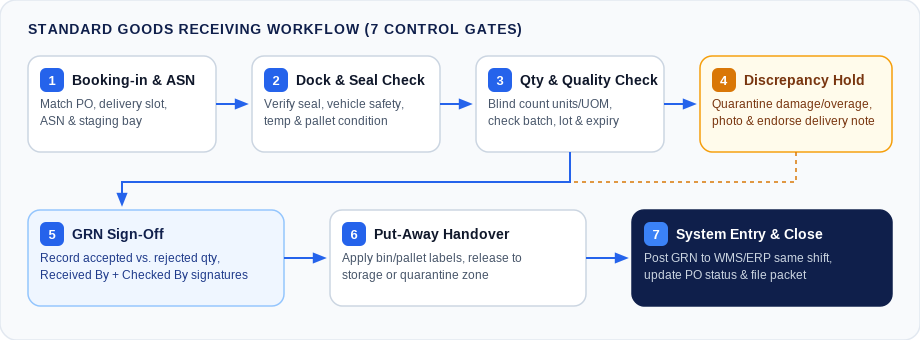
The goods receiving process step by step
Every inbound delivery — whether a full container, a palletized LTL shipment or a small courier parcel — should pass through seven repeatable gates. Skipping a gate to clear a crowded dock only moves the rework into your racking.
1. Booking-in and ASN verification
Before the truck arrives, match the carrier's booking request or Advance Shipping Notice (ASN) against an open Purchase Order (PO). Confirm the expected SKU list, pallet count, special handling equipment (such as clamp trucks or tail-lifts) and whether your receiving staging lane actually has floor space. You can estimate staging and rack capacity ahead of peak arrivals with the Warehouse Space Calculator. Unscheduled arrivals without a valid PO reference should be held at the gate until purchasing confirms authorization.
2. Dock checks, vehicle safety and seal verification
Chock the trailer wheels or engage the dock lock before anyone steps onto the vehicle bed. Verify the container or trailer seal number against the dispatch paperwork and photograph any broken or mismatched seal before opening the doors. For temperature-controlled or food-grade freight, record the reefer temperature and inspect the trailer interior for moisture, odour, pest activity or shifted loads before unloading.
3. Quantity and quality inspection (blind count)
Stage the unloaded pallets in a marked receiving zone — never directly into pick faces. Perform a blind physical count by item, checking both outer carton counts and inner pack sizes so a box of 24 pieces is never booked as 24 boxes or 1 piece. Inspect packaging integrity, SKU labels, batch or lot numbers, manufacture dates and minimum remaining shelf life. If a supplier ships mixed SKUs on one pallet, break the pallet down and segregate each SKU before counting.
4. Discrepancy handling and quarantine hold
When physical stock does not match the PO or delivery note — whether short, over-delivered, wrong SKU, expired or transit-damaged — stop that line item from entering saleable stock. Move damaged or suspect goods immediately to a clearly marked Quarantine / Hold bay, attach a hold tag, take timestamped photos and endorse the driver's delivery note with the exact exception before the driver leaves. Never rely on a verbal promise from a driver or sales rep.
5. Goods Received Note (GRN) preparation and sign-off
Issue a numbered Goods Received Note (GRN) that records the PO number, supplier delivery note, receipt date, SKU, unit of measure, ordered quantity, physical received quantity, accepted quantity, rejected quantity and batch/expiry details. Require two distinct sign-offs where staffing allows: the dock receiver who counted the freight and a checker or supervisor who verified exceptions and approved release.
6. Put-away handover and labelling
Apply internal warehouse barcode or pallet license-plate labels (LPNs) showing the SKU, batch, expiry date and receipt date so FEFO (First Expired, First Out) or FIFO rotation works automatically in storage. Hand over only the accepted, released stock to the put-away team with assigned bin locations, and route any rejected or damaged stock to its separate quarantine location.
7. System entry and document close-out
Post the approved GRN into your WMS or ERP on the same shift — ideally before put-away begins, or immediately as put-away confirms bin placement. Delayed system entry creates "phantom shortages" where stock sits physically in the warehouse while customer orders fail allocation. Attach the signed delivery note, photos and GRN packet to the PO record so three-way matching (PO, GRN, supplier invoice) is clean.
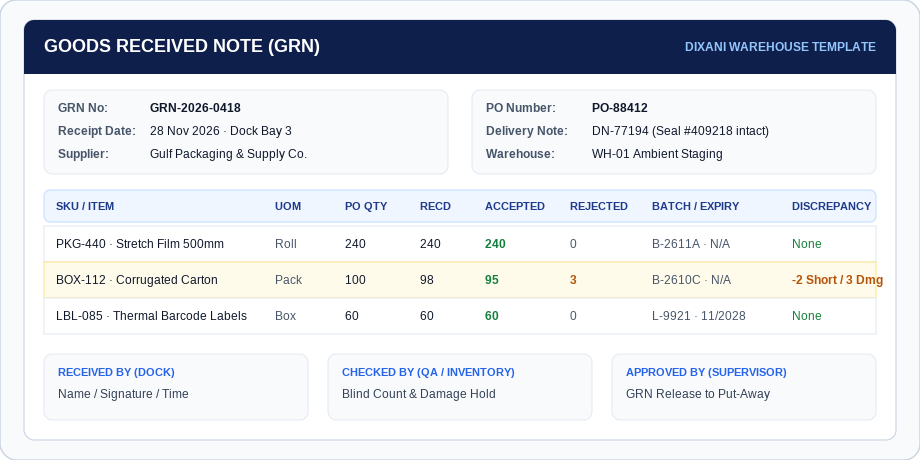
Worked receiving scenario: PO-88412
To see how the seven gates protect stock accuracy in practice, walk through a single inbound delivery arriving at Dock Bay 3 on a busy morning shift.
Delivery Summary: PO-88412 (Gulf Packaging & Supply Co.)
Booked arrival: 08:30 slot · Seal #409218 intact · Ambient dry van
Ordered on PO: 240 rolls of Stretch Film (PKG-440), 100 packs of Corrugated Cartons (BOX-112), and 60 boxes of Thermal Labels (LBL-085).
Physical inspection findings:
• PKG-440: 240 rolls counted, dry and undamaged → 240 accepted.
• BOX-112: Only 98 packs on the pallet (2 packs short of the 100 on the delivery note), and 3 packs on the bottom corner are water-stained and crushed → 95 accepted, 3 rejected to Quarantine, 2 short-shipped.
• LBL-085: 60 boxes counted, batch L-9921, expiry 11/2028 → 60 accepted.
Notice what happens next if the receiver follows the SOP versus taking a shortcut:
- With the SOP: The receiver photographs the 3 crushed carton packs, moves them to the Quarantine bay, notes "2 packs short, 3 packs water-damaged" on the driver's POD before signing, and issues
GRN-2026-0418for 95 accepted packs ofBOX-112. Purchasing receives an immediate discrepancy alert for 5 packs (2 short + 3 damaged) and withholds payment for those 5 packs until a credit note or replacement arrives. - Without the SOP: The receiver signs for 100 packs, posts 100 into the ERP, and leaves the 3 wet packs in a corner. Two weeks later, packing runs out of cartons 5 packs early, triggers an emergency rush order and logs an unexplained variance during month-end cycle counting.
In practice: real-world receiving notes from the dock
The errors I see most often at receiving are quantity discrepancies, the wrong item or SKU — including the wrong batch or expiry date — and damaged items with documentation problems. My routine is the same for all of them: double-check against the PO and the delivery documents before anything is received in the system. With a quantity discrepancy, the relevant departments and the supplier are informed about the shortage or excess first, and only then do we do the system receiving. With a wrong item, I check the item description, SKU, barcode, expiry date and batch number against the PO and make the correction before receiving. Damaged items are kept separately and noted on the documents, and documentation errors are cross-checked against the PO in the system.
The one check I never skip is verifying the delivery against the PO and the delivery note before unloading or receiving any goods.
That check has saved us more than once. On one delivery, the quantities in the PO and the delivery order did not match the physical quantity. We found it at the initial receiving inspection. Instead of completing the GRN, I asked my team to recheck the quantity, and after verifying the shortage I informed the purchasing team and the supplier about the missing items. Because we identified the error before the system receiving, we managed to avoid a discrepancy altogether.
Common goods receiving mistakes
Even experienced warehouses slip into bad habits when dock pressure rises. Watch for these seven recurring failures:
- Signing "STC" (Subject to Check) without noting visible exceptions: Many carriers treat a generic stamp as a clean receipt once the truck leaves the yard. Always write the specific carton count short or visible damage on the POD.
- Allowing put-away before GRN approval: Once mixed or unverified stock is pushed into high-bay racking, tracing which supplier delivery caused a shortage or wrong batch becomes nearly impossible.
- Counting by pallet instead of by SKU and UOM: A pallet configured as 40 cartons × 12 units (480 pieces) can easily be entered as 40 pieces if the receiver does not check the ERP unit of measure.
- Mixing damaged goods with good stock: Leaving one crushed carton on a good pallet guarantees it will be picked for a customer order or counted as saleable inventory.
- Receiving without a PO or authorization: Accepting unscheduled samples, returns or over-shipments onto the dock without a PO or RMA creates orphan inventory that accounting cannot match.
- Batching GRN entry at the end of the week: Holding paper GRNs on a clipboard until Friday forces pickers to work around "missing" stock that is actually sitting in the aisles.
- Skipping shelf-life and batch capture: Failing to record expiry dates at the dock breaks FEFO rotation and hides short-dated stock until it expires in the rack.
Standardizing your receiving paperwork
A consistent receiving SOP only works if every shift uses the same fields and approval rules. Start by issuing a standardized Goods Received Note template at every dock station, paired with a dedicated staging lane sized using the Warehouse Space Calculator so inbound pallets do not spill into outbound dispatch.
Use free DIXANI receiving & control tools
Pair this SOP with free DIXANI templates and calculators to control inbound stock, size your receiving staging area and keep inventory records accurate after put-away.

Frequently asked questions
What is the difference between a Delivery Note and a Goods Received Note (GRN)?
A Delivery Note (or packing slip) is issued by the supplier or carrier to state what they claim to have delivered. A Goods Received Note (GRN) is your warehouse's internal control record confirming what was physically counted, inspected, accepted and rejected against the Purchase Order.
Should we unload a truck if the supplier delivers without a Purchase Order?
No, not as a normal receipt. Hold the vehicle or stage the freight in a designated unallocated holding zone while purchasing confirms whether a valid PO exists or authorizes an emergency receipt. Unreferenced stock creates immediate three-way matching failures.
What is a blind count at receiving, and why does it matter?
In a blind count, the receiver is given the SKU and unit of measure to count, but not the expected PO quantity. This prevents the receiver from assuming the ordered quantity is present and forces an actual physical count of cartons and loose units.
How should we handle over-deliveries from a supplier?
Never absorb an unauthorized over-delivery into available stock by overriding the PO. Either reject the excess back onto the truck with a noted POD, or place it in Quarantine/Hold while purchasing decides whether to amend the PO or return the surplus.
How quickly should a GRN be posted into the WMS or ERP?
Post the approved GRN during the same shift — ideally immediately after inspection and before put-away. Delaying system entry by even one day causes false stockouts, duplicate reorders and inaccurate cycle-count baselines.
Who should sign off on a Goods Received Note?
At minimum, separate the person who physically receives and counts the goods (Received By) from the person who verifies exceptions or approves release into available stock (Checked By / Approved By). Even in a small team, a second-person check on discrepancies prevents costly entry errors.
References & further reading
- UK Health and Safety Executive (HSE) — HSG76: Warehousing and storage: A guide to health and safety
- UK Health and Safety Executive (HSE) — Workplace transport: Loading and unloading
- Association for Supply Chain Management (ASCM) — Receiving operations overview
- U.S. Food and Drug Administration (FDA) — FSMA Final Rule on Sanitary Transportation of Human and Animal Food